ELA Anchor Charts

Wednesday, April 12, 2023 No comments

Next up - ELA Anchor Charts. If you saw my blog post on math anchor charts you already know I love anchor charts in my classroom and how they can help. 

Here are my ELA anchor charts. I print an 8.5 x 11 size and 3-hole punch it for students to keep in their ELA/Writing binder to reference back when they need to. 

There are six anchor charts in the bundle including: 

  • Theme
  • Character, Setting, and Plot
  • Compare and Contrast
  • Author's Point of View
  • Text Structures 
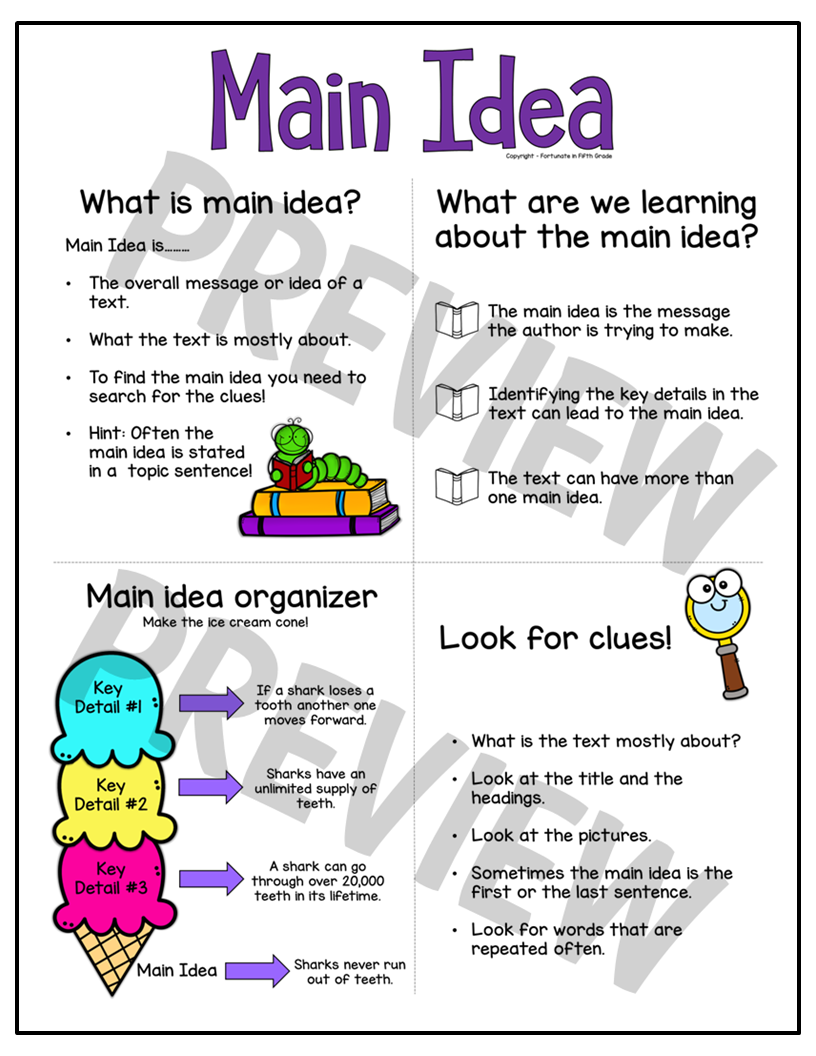
  • Main Idea and Key Details
You can buy them individually or save and grab the bundle. I provide step-by-step directions on how to print them in the anchor chart size of your preference. Click HERE to see the preview in my store for more information.


Math Anchor Charts

Tuesday, April 11, 2023 No comments

I absolutely love anchor charts. Having a visual up for my students to remind them of the strategies we are using in math really helps them and I constantly catch them looking over at them.

  • Math anchor charts are visual aids that help students to understand and remember key concepts and skills in mathematics. Here are some reasons why teachers should use math anchor charts in their classrooms: 
  •  Visual learning: Many students are visual learners, meaning that they learn best when information is presented in a visual format. Anchor charts are a powerful tool for visual learning as they use graphics, diagrams, and illustrations to make concepts more engaging and easier to understand. 
  • Promote retention: Anchor charts can help students to retain information by providing a visual reference point that they can refer back to when needed. When students can see and interact with the information, they are more likely to remember it. 
  • Encourage participation: Anchor charts can encourage participation and interaction in the classroom. By using sticky notes or other interactive elements, students can add their own thoughts and ideas to the anchor chart, making it a collaborative tool for learning. 
  • Scaffold learning: Anchor charts can be used to scaffold learning by breaking down complex concepts into smaller, more manageable pieces. This can help students to understand the big picture and see how different concepts are related to each other. 
  • Support differentiation: Anchor charts can be used to support differentiation by providing different levels of information for students with different levels of understanding. By creating different versions of the same anchor chart, teachers can provide support for struggling learners and challenge more advanced students. 
  • Increase engagement: Anchor charts can make learning more engaging and fun for students. When information is presented in a visually appealing and interactive way, students are more likely to be interested and engaged in the learning process.

I created these math anchor charts for my classroom but could be used for any upper elementary grade level depending on your math targets and standards.

My primary teachers would like me to create anchor charts for their grade levels so be on the lookout for those this summer! (K, 1st, 2nd, 3rd, and 4th coming soon!)

Here are a few anchor charts. All anchor charts come with step-by-step directions on how to print them based on your size preference. You can also buy them individually. Click HERE to see the preview in my store for more information.


2023-2024 School Year Calendar

Monday, April 10, 2023 No comments

I know! I know! Who's thinking about next school year. We are all just trying to make it to the end of this year! However, I had a 2-week break from my masters work so I tried to catch up on some new products for my TPT store. 

I have had such great feedback on my calendars through the years and thank you all for your sweet comments. The 2023-2024 calendar is done and up in my store. I offer a color or black and white version. I am thinking of making it digital but not sure. Leave me a comment if you would use a digital calendar. I would love the feedback. 

Here is a sneak peek at this years calendar. Click HERE to see a preview


April is here! Time for poetry!

Sunday, April 9, 2023 No comments

I love when April rolls around. That means I get to teach my mini poetry unit. I made this poetry packet to inform my students about 7 different types of poetry, provide them with examples, and give them a space to make their own poetry rough draft. When they are finished with their packet they put their final pieces into a poetry slide deck I create for them to cherish forever! 

It's up in my store now. Click on the picture and go take a peek! 


Pear Deck for Learning and Assessment

Wednesday, January 4, 2023 No comments

Have you used Pear Deck yet? As part of my master's program, I choose Pear Deck for one of my assignments and just had to share with you how easy it is to use Pear Deck for learning and assessment in your classroom. Bringing technology into the classroom can provide a learner-center environment, provide authentic assessment, and meet the needs of diverse learners in the classroom. 

What is Pear Deck? Pear Deck is an add-on tool that works with Google Slides. Teachers can create a lesson in a slide deck and add Pear Deck to initiate interactions in real-time. I used an ELA lesson on characters, setting, and plot, and explain the sequence of events using a realistic fiction story.   

Let's get started!

Teachers can access Pear Deck to add to their lessons in Google Slides. Teachers will open their lesson and then go to Add-ons, Pear Deck for Google Slides, and Open Pear Deck.

2.     Once Pear Deck is open teachers can add interactive slides from Pear Deck’s template library or create their own activity slide from the Ask students a question. 

 Once the teacher has found the interactive slide that works best, they can add it to their slide deck. The teacher can edit the text, change multiple-choice answers, add text boxes, and rename draggable pieces.


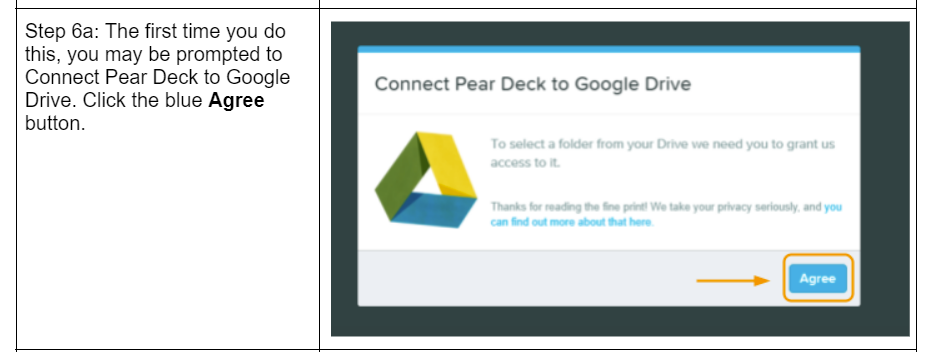
 After the lesson is complete and the teacher has added all interactive Pear Deck slides teachers can then embed the lesson into Schoology for the students to access by following these steps.


After the lesson is embedded in Schoology students can access it in Schoology, click on the tool, and immediately begin the lesson. When they are in the lesson the teacher can open their dashboard and see live feedback during the lesson and be able to provide feedback to the students as well.


I hope these steps help you. Please reach out with any questions and I would love to hear about what you created in Pear Deck for your classroom! Check back soon for a Pear Deck on math that you can use in your classroom! 

2022 - 2023 School Year Calendar

Monday, June 20, 2022 No comments

Back by popular demand - many of you loved my calendar last year and thank you all for supporting my store!

If you are looking for a cute calendar to keep yourself organized for this year's school year look no further! This cute July 2022 - June 2023 calendar is a great way to keep birthdays, PD days, meetings, conferences, breaks, and more organized. Many of my followers use this to send home to parents to keep them informed on school events, assignment due dates, and days where there is no school or early releases. 

Head over to my store to grab it HERE


Free Calendar for the 2022-2023 School Year

Wednesday, June 15, 2022 No comments

 Go grab my FREE calendar to keep all your important dates and reminders for the school year in one place! This super simple rainbow calendar includes 12 months from July 2022 to June 2023. Here's to a great 2022-2023 school year!! 


Head on over to my TPT store HERE to download the calendar! 


Christmas Gifts For My Students!!

Sunday, November 28, 2021 No comments

I was very productive over the much needed Thanksgiving Break! I needed an inexpensive gift for my students. I love giving personalized gifts so why not give a personalized gift to each student. I decided to make ornaments made out of their name. I have been dying to try cutting some other materials on my Silhouette machine so why not try craft foam! 

Amazon to the rescue! I ordered craft foam that had the adhesive backing on it thinking it would be easier. Ha! Nope! I knew that I was going to have to cut the name the right way and then flip the name horizontal so that both sides would be glittery and read their name. I also order the 2mm craft blade on Amazon to cut the foam. A trip to Hobby Lobby scored me the hooks and the little holiday themed charms I wanted to attach to the names. 

In the design studio, I used my name for my first attempt. When I went to send it to the machine all these little squiggly lines showed up on the mat! What?? After some googling and YouTube searching I found nothing but did learn that the kraft blade does not turn like the auto blade as only one side of the blade is used to cut. I finally figured out this is how the machine turns the blade so the sharp edge of the blade is cutting. So if you have never used the kraft blade before let me save you the worry when you see this.....


I cut my name forward and backwards, pulled the mat out and.......nope no cut! When I finally found a setting that worked (I still had to work at the name to pop it out as it still did not cut all the way thru the foam) I had both cuts and popped them out. I pulled the backing off and then attempted to attach the two names together. DISASTER! That adhesive is really sticky and I found the flexibility of the foam didn't really give me room for errors in matching them up correctly! 

So back to Amazon to order craft foam with no adhesive. Once I got that I was off and running. I found the perfect setting. When you choose craft foam, bump the force up to 27 and do 4 passes. This is what I found did the trick. I still had to pop out the name from the material but it was simple. 


Once I got all the names cut forward and backwards it was time to glue. I ended up running up to Hobby Lobby again to get craft glue because, of course, mine was dried out! I choose to try the clear gel tacky glue because you can't go wrong with clear glue! It worked great. I let them dry overnight.


The last thing to do was dress it up with a cute charm and a swirly hook. I loved how they came out! Hope the students love them too! 


Wonders 5th Grade Packets

Sunday, August 1, 2021 No comments

 We use Wonders for our ELA curriculum. There is A LOT of stuff in this program. We use some of it and some of it we don't. I wanted to create a packet for my students that focuses on the parts of the curriculum that we do use.


We focus on the first story in each week. If time allows we try to fit in the second story. My district does not require any spelling requirements. So I took out the weekly spelling words. This cover is what we cover - essential question, genre, vocab words and strategy and a comprehension skill. Ever week for every unit has this cover page. 


The next two pages relate to the story we read. We will cover the essential question, the vocabulary and comprehension strategy, and the genre. 


The next two pages works with the vocabulary in the week. Students will have to use 3 words in their own sentence and then each week has a vocabulary practice sheet. 


The next part in this packet is the grammar practice. I have separated the grammar rules page and the practice page. Students will put their rules page in their writing binder as we complete them to help when they are writing. I also tie in a grammar interactive notebook page that correlates with the grammar rule we are learning.


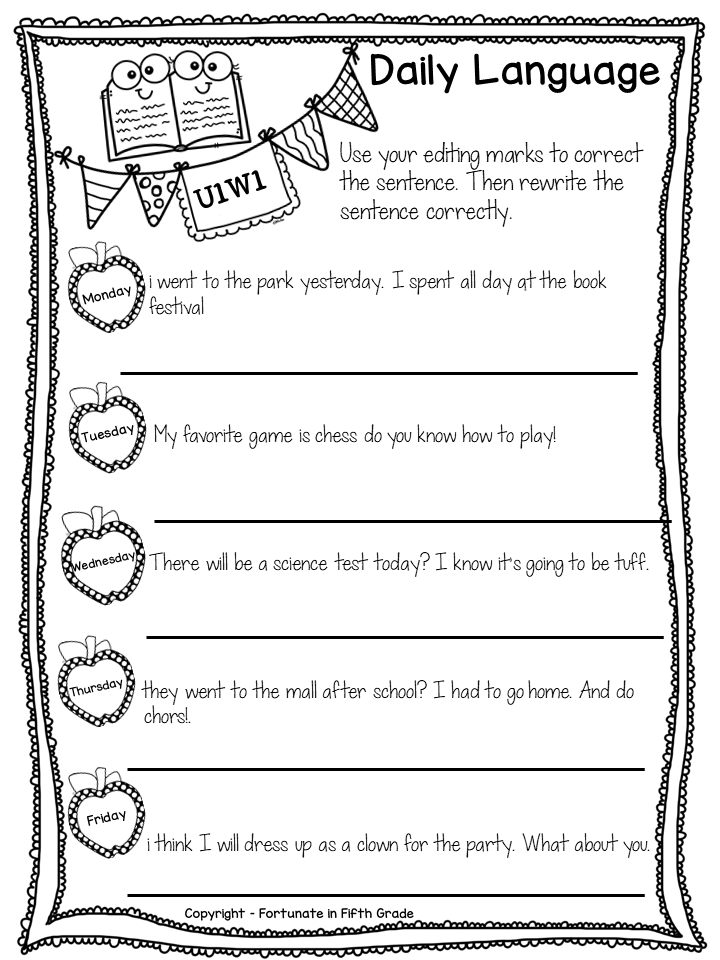
The last page of this packet is the daily language page. As they learn the strategies they will use them to find the errors in the sentence. I also teach editing marks and require the students to mark up the sentence then rewrite it. This could be used as morning work too. 


Of course all units come with answer keys too! I know not all teachers use wonders so I have separated out the vocabulary, grammar, and daily language as stand alone products too. Head on over to the store to grab the bundle. If you would like to try before you buy Unit 1 Week 1 is free in my store.